Retail Display Fixtures for Electronics and Mobile Stores: Types, Design and Buying Guide
An electronics or mobile store has to solve a contradiction that a clothing rack never faces. The product sells by being handled, which rules out locking everything away, and yet an open counter of high-value devices invites loss. Every fixture decision in this category, from counter height to cable routing, sits on that tension.
This guide covers the fixture types used in electronics and mobile retail, the design decisions that matter, and what to specify when you buy. It is written for brand retail heads, store development teams, franchise owners and procurement.
The main fixture types
| Fixture | What it does | Design notes |
|---|---|---|
| Demo table or island | Lets customers handle devices that stay attached to the fixture | Security mounts and a charging rail keep devices powered and attached. Route cables under the tabletop so the surface looks clean |
| Locked glass counter | Holds higher-value items and accessories that staff retrieve | Common where the demo unit is not the item being sold |
| Wall unit with slat wall or hooks | Displays cases, chargers, earphones and similar accessories | Floor-to-ceiling wall units and hooks use wall space instead of floor space. Gaps on a slat wall are easy to spot |
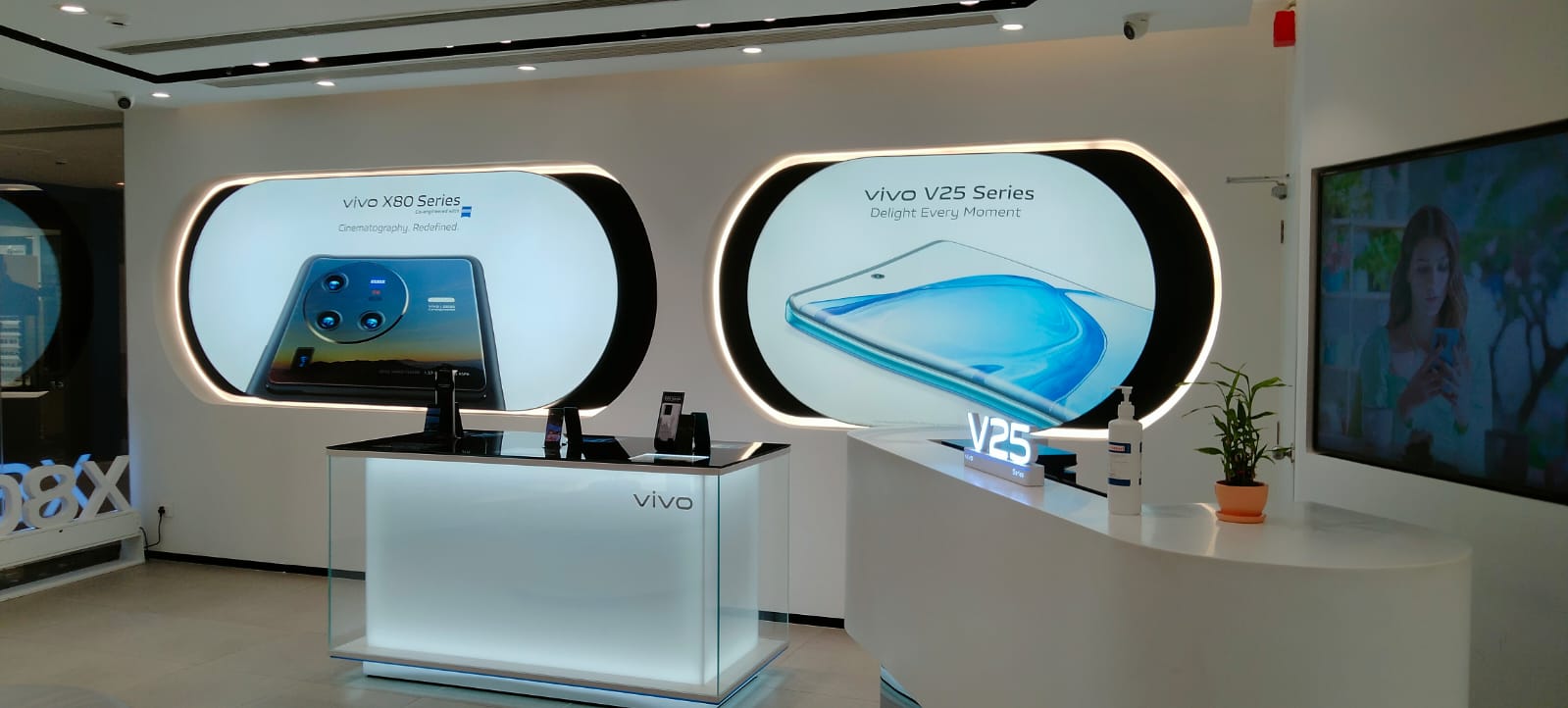
| Brand wall | Carries the brand identity behind the counter | Often a wood feature wall combined with a minimalist glass counter and integrated anti-theft mounts |
| Combined service counter | Joins security, demo access, service workflow and checkout in one piece | A frequently cited benchmark because it solves several problems in one fixture |
Other formats are widely used in the category, such as gondolas and rotating towers for lower-value accessories, and lit headers for brand zones. Choose them for the product, not for variety.
Decide demo or lock, category by category
Do not apply one rule to the whole store. A smartphone, a smartwatch, earbuds and a laptop each need a different mount, and a charger or case needs none. Write a table of categories and decide for each whether it is tethered on an open table, held behind locked glass, or hung on a wall. That table becomes the fixture schedule, and it is the first thing a vendor needs to quote accurately.
Security belongs in the fixture
Security that is added afterwards is weaker than security designed in. Specify the mounting hardware, cable routes, locks and any sensor wiring at the drawing stage, so they sit inside the structure and not on top of it. Our illuminated and demo formats under point-of-sale materials follow the same logic: plan power and fixings before finishes.
Layout by store format
| Format | Fixture priorities | Watch out for |
|---|---|---|
| Brand flagship or experience store | Several demo tables, brand wall, glass service counter, lit headers | Cable management and power points on the floor plan |
| Multi-brand store | Modular brand bays on a shared wall system, shared demo island | Each brand’s identity rules and who pays for fixtures |
| Compact mobile outlet or kiosk | A single demo island of about 1.8 by 0.5 metres with rounded ends, holding four to six devices, with about a metre of aisle each side, plus wall units | Storage built into the base, because there is rarely a stockroom |
Finish and lighting
Electronics fixtures tend to favour clean technical finishes such as brushed metal, matte black, light oak and glass, so the product is the focus and the fixture frames it. Lit panels behind the counter reinforce the brand without competing with the devices.
A buying guide: what to specify
- Product list by category with device sizes and weights.
- For each category: tethered, locked or hung, and the mount type.
- Number of live demo units per store.
- Power and data: points per table, charging rail, cable routes, access for maintenance.
- Storage under counters and on walls, sized to a day’s stock.
- Finish library and brand colours as codes, not descriptions.
- Lighting: lit headers, shelf light, who supplies the drivers.
- Delivery, installation scope and sign-off by store.
- Spare parts for mounts, locks and cable assemblies.
Common mistakes
- Treating every product the same, so the store is either locked down or exposed.
- Adding security after the fixture is made.
- Forgetting cable routing, so wires cross the display surface.
- Copying a flagship layout into a small outlet.
- Not planning storage, so stock ends up on the floor.
Frequently asked questions
What fixtures does a mobile store need?
Typically a demo table or island with security mounts and a charging rail, a locked glass counter for accessories and higher-value items, wall units or slat walls for accessories, a brand wall and a service or checkout counter.
How do you stop theft without stopping customers from handling devices?
Tether the demo unit to the fixture with an anti-theft mount and keep the sellable stock behind locked glass or in storage. Staff retrieve boxed stock on request.
How much space does a small mobile store need for demo tables?
One layout guide describes an island of about 1.8 by 0.5 metres holding four to six devices with about a metre of aisle on each side. Actual needs depend on the shop.
Should accessories be on open display?
Lower-value accessories can hang on slat walls or hooks. Higher-value accessories are usually kept in locked glass counters.
How long does a custom fixture set take?
It depends on design approval, materials and quantity. Ask the vendor for a schedule that starts from approved drawings.
Beyond Retail’s public project portfolio includes work for consumer electronics and telecom brands, and its in-house design, fabrication and printing in Delhi NCR suit the demo-table-plus-security combination this category needs. See turnkey showroom and fixture execution and our retail fixture page. Share your layout and security needs and we will propose a fixture schedule.